
Vertical: GP
PMS Eligible: BP, Communicare, Consult, Genie, Medtech, Pracnet, Pracsoft, Practice 2000, Zedmed, Helix
Now you can update the default Cancellation time and the blackout settings via your Practice Admin Portal.
Simply log in to your Practice Admin Portal, select Appointment Setup, and the submenu below Appointment Settings. 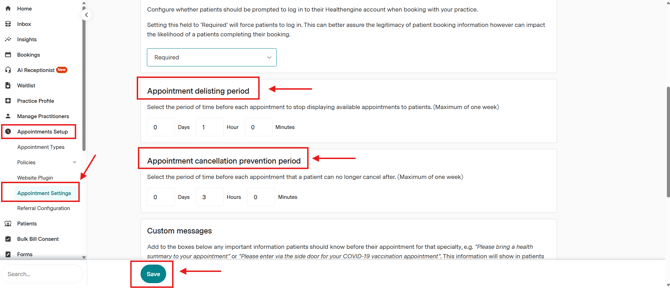
Simply adjust the value to your preference, and don't forget to click on the save button.
If you are unable to see this section, it may be possible that you are not allowed to change it from your end. You can always reach out to our support team to change these two settings.
Please note that not all practice management softwares allow online cancellation.
Blackout Time
By default, Healthengine has a blackout time of 1 hour.
What this means is that appointments will only show up to an hour before the appointment time and then will be hidden.
This is to allow patients enough time to arrive at your practice for their appointment from wherever they might be booking it.
For example, if it is 10 am, the next appointment available to be booked online would be 11 am.
You can also use the blackout time to allow yourselves more time to prepare for the appointment. For example, some practices that have staff who are not always at the location might want a blackout time of 6 hours, so that they have enough time to get to the practice or prepare for the appointment.
Your blackout time can be changed to any amount of time you prefer.
Cancellation Time
By default, Healthengine has a cancellation time of 2 hours - what this means is that a patient will only be able to cancel their appointment online up to 2 hours before the appointment time. If they try to cancel within the 2 hours, then they will have to call the practice to cancel their appointment.
Your cancellation time can be changed to any amount of time you prefer.
One thing to keep in mind if you decide to increase your practice cancellation time is that it could mean more work for your front desk staff, as they then have to take the cancellation calls over the phone.
Please note: The blackout and cancellation times can only be set as an overall practice setting, not on an individual practitioner level.