
Have you received an email saying your Evo connection has been lost? This usually means the Healthengine Appointment Connector has stopped. Patients cannot book with you online until it is restored.
Please Note: This article is for Back In Motion clinics that use Evo. If your clinic uses Nookal, please see Nookal Connection Lost instead.
Please Note: Once the connection is back, check your Healthengine profile to confirm your appointments are showing.
Page Contents
- Step 1: Send This Article to Your IT Team
- Step 2: Restart the Appointment Connector
- Step 3: Check Your Appointments Are Showing
- Contact Our Support Team
Step 1: Send This Article to Your IT Team
Back In Motion's IT team looks after the Appointment Connector. Please forward our email and this article to them. Step 2 has the steps they need.
Step 2: Restart the Appointment Connector
- On the server, select Start, type Services and open Services.
- Find HealthEngine Appointment Connector and double-click it.
- If the status shows Running, click Stop and wait for it to stop.
- Click Start.
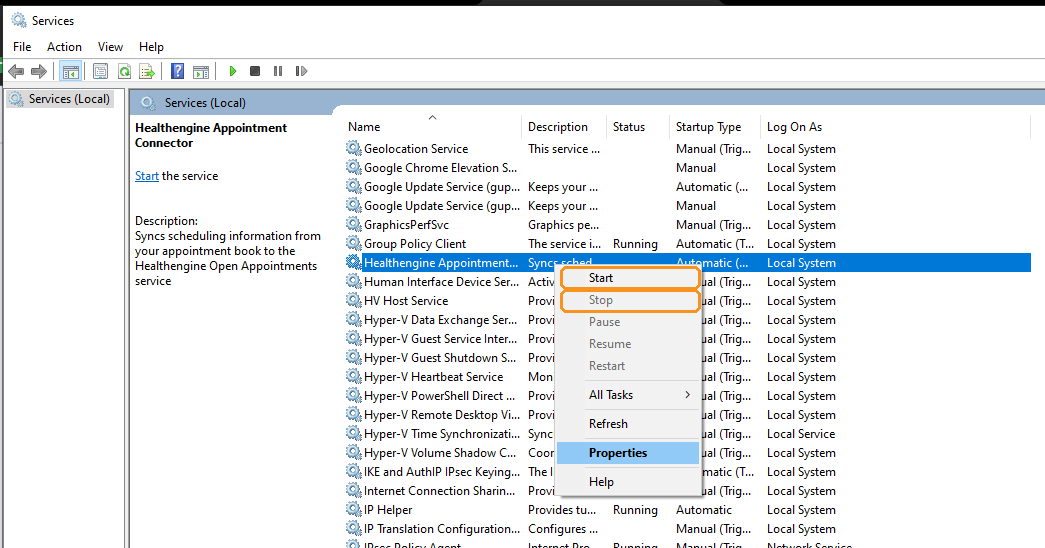
If the service will not start, restart the server and try again.
Step 3: Check Your Appointments Are Showing
Wait a few minutes, then check your Healthengine profile to confirm your appointments are showing.
If some appointments are missing, please check these settings in Evo:
- the service has App Booking ticked
- the practitioner is enabled for Online Bookings
- the practitioner has a roster for those dates, with the correct start and finish times
If you have added a new service, please contact us. We need to link it to a Healthengine appointment type before patients can book it.
Contact Our Support Team
If your appointments are still not showing, our Support team is happy to help. To help us resolve the issue quickly, please have the following ready:
- your clinic name
- contact details for your Back In Motion IT team
For ways to reach us, see Need more support? Here’s how to contact us.
You may also find this article helpful: Restarting your Healthengine Appointment Connector