Vertical: Dental
PMS Eligible:D4W
What is Dental Smart Recalls?
Dental Smart Recalls is an AI-powered SMS-based recalls product that helps practices reach out to patients who are due for an appointment, making it easier for patients to book, and helps front desk staff stay on top of recalls so patients don’t slip through the cracks.
How does is it work?
- Your practice exports a list of patients who are due for a recall from your Practice Management System (PMS).
- The only required fields for a send are:
- Patient first name
- Patient last name
- Patient date of birth (DOB)
- Patient mobile number
- Practitioner (optional)
- Your practice imports this list into Dental Smart Recalls.
- Dental Smart Recalls sends the initial recall SMS and handles the SMS conversation to guide the patient to book.
What happens if a patient doesn’t respond?
If a patient doesn’t respond to the initial message, Dental Smart Recalls sends a follow-up nudge 48 hours later.
Example nudge: “Hi Wendy, just checking if you saw my last message. If you've already booked, no problem. If not, would you like available times?”
If the 48-hour nudge would land on a weekend, it is delayed until Monday.
Additional nudges are also sent at:
- 9 days
- 30 days
Can our practice customise the initial SMS message?
Yes. Practices can customise the initial SMS template, with some constraints:
- The first sentence is locked for legal reasons.
- The remainder can be edited by the practice.
- Supported custom fields include:
- Practice name
- Practitioner first name
- Practitioner last name
- Patient first name
- Patient last name
Can patients opt out of recall messages?
Yes. If a patient replies saying they no longer want to receive these messages (for example, “stop” or “unsubscribe”), Dental Smart Recalls will mark them as opted out.
Once a patient is opted out, they will not be sent future recall messages — even if they are included again in a future import.
Can practice staff step in and take over a patient conversation?
Yes. If a conversation needs a human response, practice staff can click the Step in button.
When a staff member steps in:
- Dental Smart Recalls will stop replying to messages from that patient, and
- Your practice can send messages to the patient directly through the interface.
How does Dental Smart Recalls handle families where multiple patients share one phone number?
If multiple patients share the same phone number, Dental Smart Recalls does not attempt to coordinate multi-patient bookings via SMS.
Instead, Dental Smart Recalls lists the patient names and asks the recipient to call the practice to book.
Example: “Hi, this is (practice name). Gabriel, Allegra and Lisamarie are due for a check-up and clean. To book them in, please call us on (practice phone number). Please do not reply to this message.”
If a patient books outside the SMS flow, can we mark them as already booked?
Yes. If a patient books via a different path (for example, the practice books them manually, the conversation is handed over, or the patient books outside the SMS flow), practice users can manually Mark as booked.
This keeps booking counts and reporting accurate and stops any future recall nudges being sent to that patient for the current send.
Is selecting a practitioner required?
No. Practices can choose not to specify a practitioner and instead use availability across all practitioners.
How it works:
- If no practitioner is provided (for example, in the upload), Dental Smart Recalls will automatically use availability across all practitioners.
- If a practitioner is included in the import, the patient will only see availability for that practitioner.
- The setup screen includes two templates: one for when a practitioner is defined, and one for when they aren’t.
What happens when a patient needs something Dental Smart Recalls can’t do?
Currently, if a patient asks something outside of scope, Dental Smart Recalls will tell them to call the practice and provide the patient with the clinics phone number.
Can we use appointment types that require a payment or deposit?
No. The appointment type Dental Smart Recalls uses cannot be one that requires a payment and/or deposit to book.
If your practice uses appointment types with deposits, select an appointment type that does not require payment for the Dental Smart Recalls send.
How do we export a recall list from our PMS?
D4W (Dental4Windows)
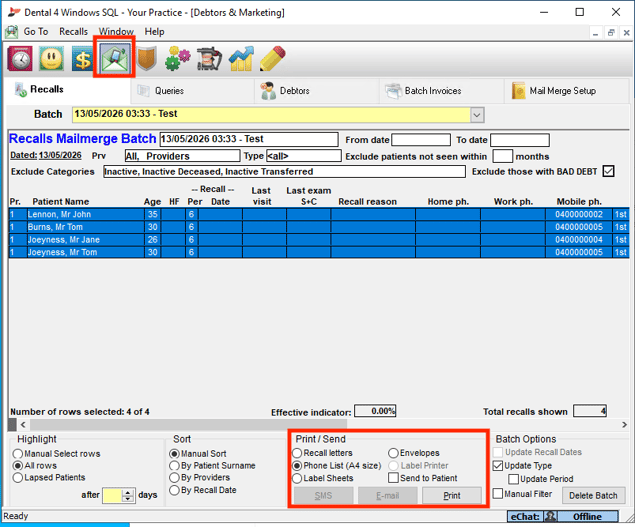
- Step 1: Create a recall batch under the Debtors and Marketing screen.
- Step 2: Under Print / Send, select Phone List (A4 size), then select Print.
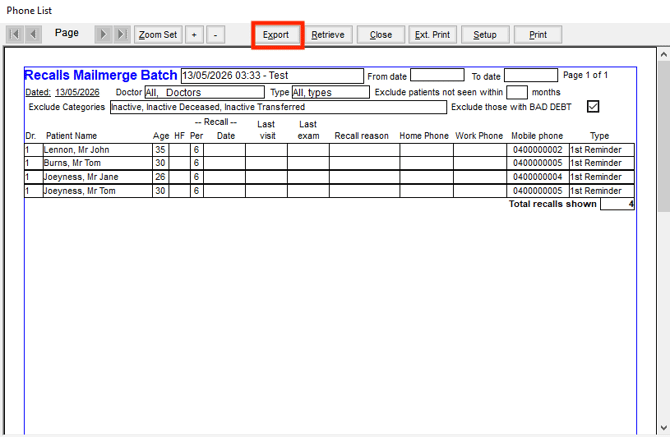
- Step 3: Select Export.
- Note: Although this screen doesn’t show all the fields available, the export will contain everything available for that patient.
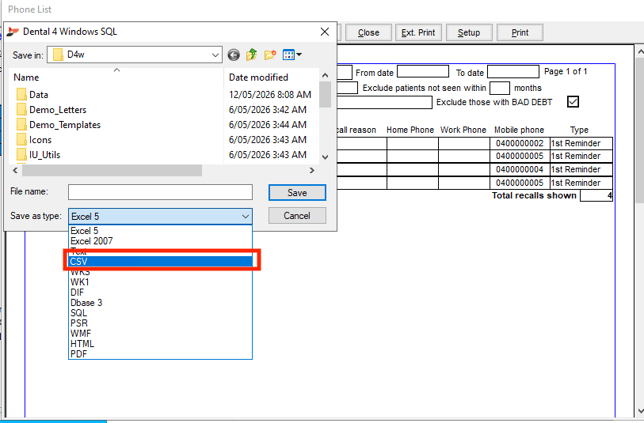
- Step 4: Set File type to CSV, then click Save.