
Have you received an email saying your Dentrix Ascend connection has been lost? This is usually a temporary problem on the Henry Schein One side, or a change to your default appointment reason. Patients cannot book with you online until it is restored.
Please Note: Once the connection is back, check your Healthengine profile to confirm your appointments are showing.
Page Contents
- Step 1: Check Your Default Appointment Reason
- Step 2: Check Your Appointments Are Showing
- Contact Our Support Team
Step 1: Check Your Default Appointment Reason
Your integration uses one appointment reason in Dentrix Ascend as its default. If that reason is deleted or changed, the connection can stop.
To see your appointment reasons, go to Settings > Scheduling Template > Appointment Reasons in Dentrix Ascend.
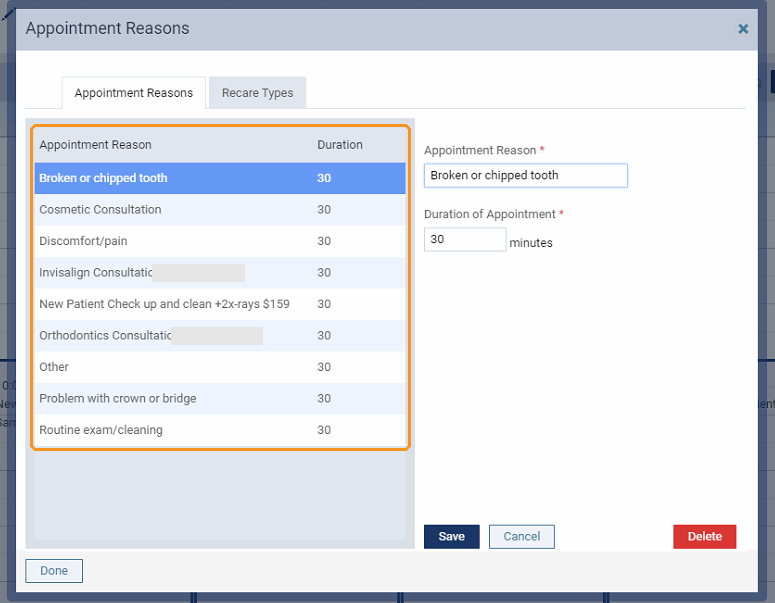
If you have recently deleted or changed a reason, please contact our Support team. We can set your connection to use a different reason.
Step 2: Check Your Appointments Are Showing
Wait a few minutes, then check your Healthengine profile to confirm your appointments are showing.
If nothing has changed in Dentrix Ascend, the problem is likely on the Henry Schein One side. Please contact our Support team and we will work with Henry Schein One to restore your connection.
Contact Our Support Team
If your appointments are still not showing, our Support team is happy to help. To help us resolve the issue quickly, please have the following ready:
- your practice name
- any appointment reasons you have recently deleted, renamed or changed
For ways to reach us, see Need more support? Here’s how to contact us.
You may also find this article helpful: Dentrix Ascend - Healthengine's Integration: Benefits & Troubleshooting