Vertical: GP
PMS Eligible: BP, Pracsoft
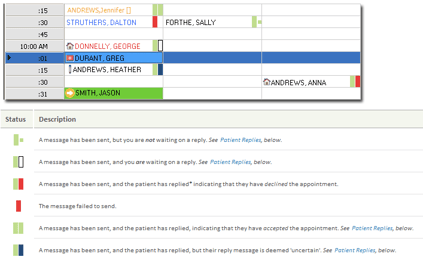
If you have Reminders Plus and wish to see the status of your appointment reminders in your appointment book, you can do so by changing some of the settings in your Practice Management Software.
Please Note: This functionality is eligible for Reminders Plus only and is only possible for practices using Best Practice and PracSoft.
Best Practice
- Go to 'Setup' > 'Configuration' > 'Appointments'.
- Ensure the "Automatically show attendance status on appointment book" option is checked.
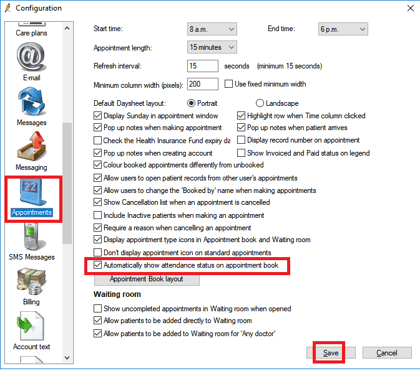
- Click 'Save'.
Attendance is now enabled and will look like the image below in your appointment book. 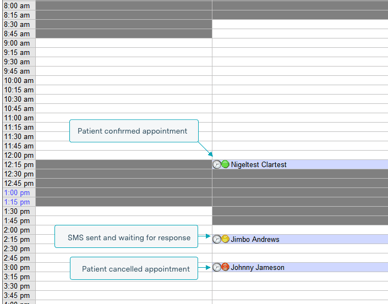
Please note: The sync to PMS consent settings in Reminders Plus will need to be disabled for practices using Best Practice Jade. This is because Best Practice's Jade edition does not allow third-party integrations to access their consent settings, regardless of whether or not they are official partners with Best Practice.
PracSoft
For PracSoft, there is no extra setup required. It will look like this in the appointment book: