
Vertical: General Practice, Dental, Allied, Specialist
PMS Eligible: Best Practice, Pracsoft, Zedmed, Helix, Gentu
Whether it's a New Patient Form, a Custom form or a Pre-screening Form, Healthengine stores these completed forms within your Practice Admin once the patient has completed it!
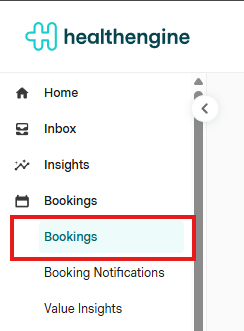
Forms completed by patients who booked through Healthengine can be found under the Bookings > Bookings page within Practice Admin.
To the far right of your list of patients, you'll see a yellow paper icon that will be in line with the patient's name who has filled out the form.
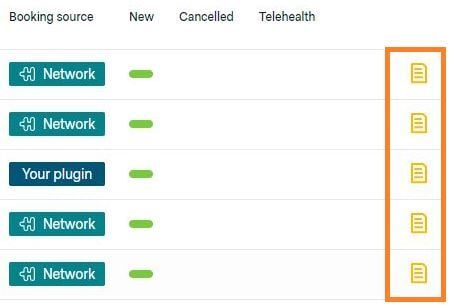
Click on the patient's name line,
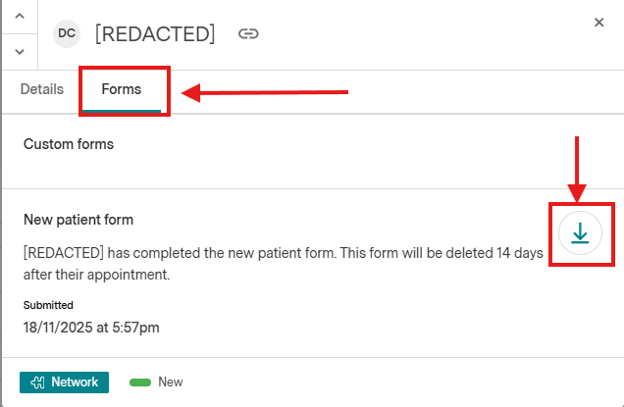
Select Forms, and you will be able to see the attached form for the patient.
You can click the download icon on the right side to download the form.
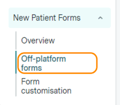
For practices with our Off-Platform New Patient Forms feature, forms completed by patients who didn't book through Healthengine can be found under the Products > Forms> New Patient Forms > Off-platform forms page in Practice Admin.
Depending on your practice software, you may also be eligible for New Patient Form and Pre-screening Form integration.
To find out more about this, check out some of our Help Centre articles below: