
Have you received an email saying your Gentu connection has been lost? This usually means Gentu was slow to send us your availability, or two locations or appointment types have the same name. Patients cannot book with you online until it is restored.
Please Note: Once the connection is back, check your Healthengine profile to confirm your appointments are showing.
Page Contents
- Step 1: Check Your Healthengine Profile
- Step 2: Check Location and Appointment Type Names
- Step 3: Check Your Appointments Are Showing
- Contact Our Support Team
Step 1: Check Your Healthengine Profile
When Gentu is slow, you may get this email even though your appointments are still showing. If your appointments are showing, no action is needed. If they are missing, continue to Step 2.
Step 2: Check Location and Appointment Type Names
Each location and appointment type in Gentu needs its own name. Please check that:
- no two locations have the same name
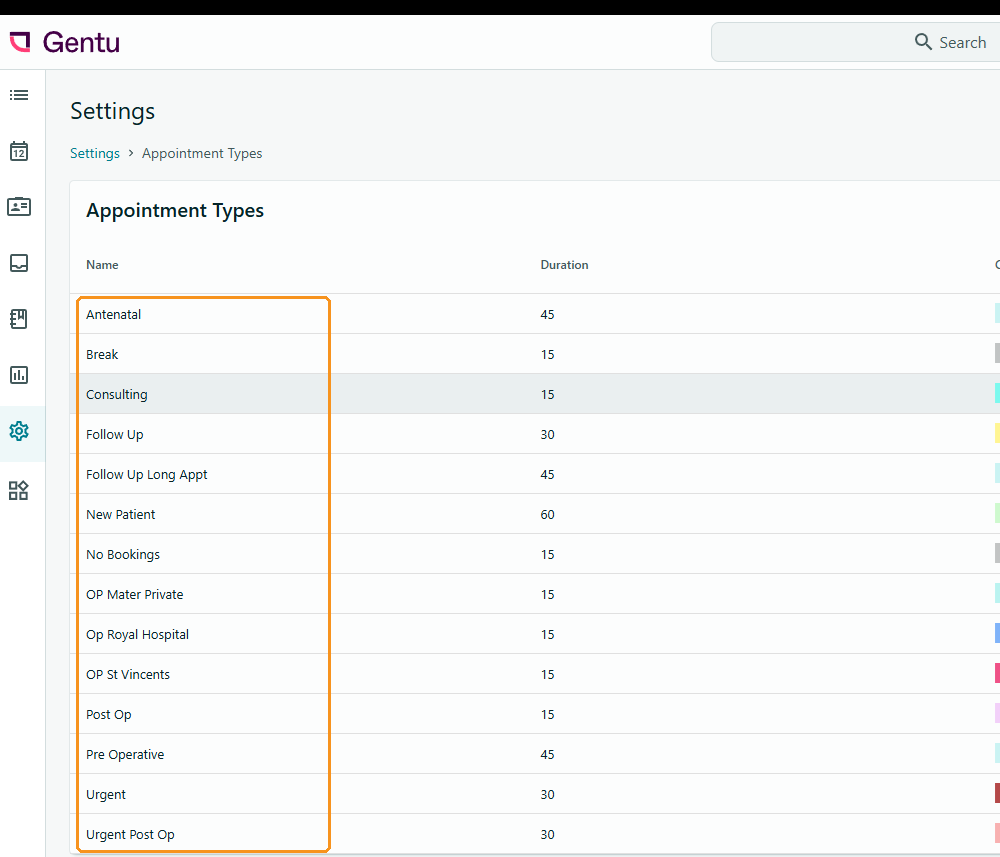
- no two appointment types have the same name
- every location has a name
Appointment types are in Gentu under Settings > Appointment Book > Appointment Types. You can edit location names in Gentu's Manage Users settings.
Step 3: Check Your Appointments Are Showing
Wait a few minutes, then check your Healthengine profile to confirm your appointments are showing.
If they are still missing, please contact our Support team. We may ask you to reconnect Healthengine in the Gentu Marketplace.
Contact Our Support Team
If your appointments are still not showing, our Support team is happy to help. To help us resolve the issue quickly, please have the following ready:
- your practice name
- any recent changes in Gentu, such as new locations or appointment types
For ways to reach us, see Need more support? Here’s how to contact us.
You may also find this article helpful: Gentu - Healthengine's Integration: Benefits & Troubleshooting