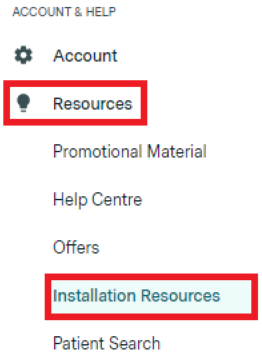
As of 21 August 2025, the legacy version of Sidebar is no longer supported. You will need to uninstall this version and download the new one, which is available in your Practice Admin portal under the Resources tab:
There are three ways you can uninstall the legacy version of Sidebar. Follow whichever method suits your Windows setup.
Option 1
- Press Windows Key + R to open the Run dialog
- Type or paste:
C:\Program Files (x86)\Healthengine Appointment Sidebar\uninstall.exe - Press Enter
- Follow the uninstall wizard prompts
Option 2
- Press the Windows Key
- Type: add or remove programs
- Click the first result that appears
- Search for: Healthengine Appointment Sidebar
- Click on it and select Uninstall
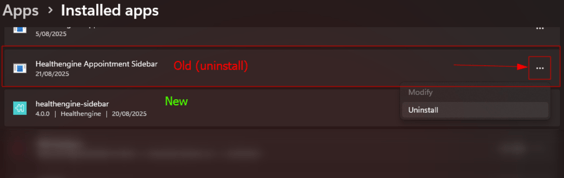
Option 3 – Windows Settings
- Press Windows Key + I to open Settings
- Click Apps
- Select Installed Apps
- Search for: Healthengine Appointment Sidebar
- Click the three dots (⋯) next to the programDownload and install the new version of Sidebar
Once you have successfully uninstalled the legacy version, download the new Sidebar installer from your Practice Admin portal under the Resources tab. Run the installer and follow the on-screen prompts to complete setup. If you need assistance, contact the Healthengine support team.
-
Select Uninstall