
Vertical: General Practice, Dental, Allied, Specialist
PMS Eligible: Best Practice, Communicare, Consult, Genie, Medtech, Pracnet, Pracsoft, Practice 2000, Zedmed, Helix, CorePractice, D4W, Dentally, Oasis/Exact, Oasis (SOE), Dentrix (SOE), Exact (HS1), Praktika, CareStack, Back In Motion, Optomate, PPMP, Sunix, CorePlus, NOOKAL, Cliniko, MMex, PracSuite, Xestro, Front Desk 2014 v2014+, Gentu, Genie
Is a public holiday coming up, and you can't see your appointments online? Fortunately, managing your public holidays is easy, whether you use your integrated Practice Management Software (PMS) with Healthengine or our Sidebar feature!
Make sure to set up a message in "Practice Profile" and then click on "Description" to add a message for the patients visiting your profile on Healthengine.
Integrated PMS
If your practice is open on a public holiday, we first recommend that you navigate to your Healthengine Practice Profile and click on "View Profile" to check what is publishing online.
If you can't see appointments online for an upcoming public holiday, you can conveniently turn this on through your Practice Admin!
To begin, log in to your Healthengine Practice Admin and navigate to 'Manage practitioners'.
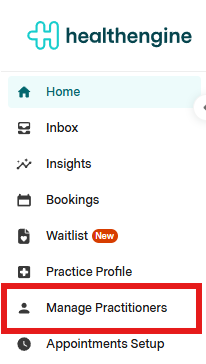
From here, select 'Edit appointment types' in line with the relevant practitioner to bring up their appointment type setup page.

Select the button: "Edit Appointment Book"
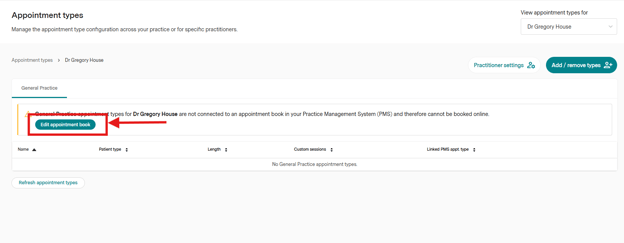
You will also be able to enable and disable the availability for online appointment on public holidays for your practitioner, toggling on or off the option "Available for online appointments on public Holidays":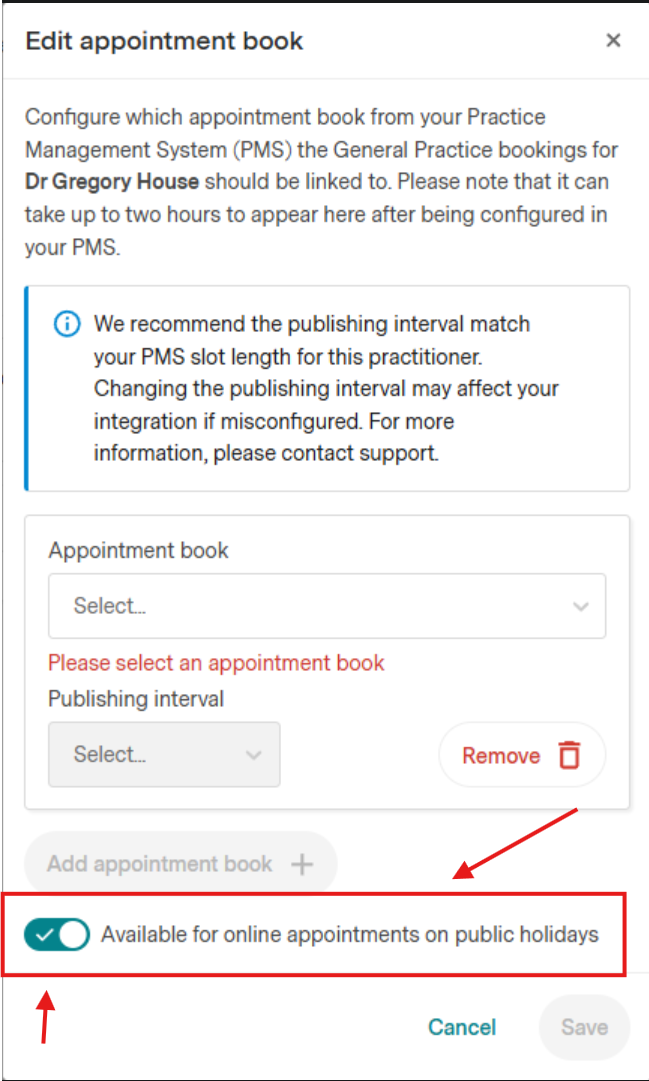
Once connected, click the Save button, and their appointments will appear online within the next 5-10 minutes.
If your practice is closed on a particular public holiday, simply close off your appointment book for this day and ensure no appointments are published on your Healthengine Practice Profile.Calendar/Sidebar Users
If your practice uses Sidebar or the Healthengine Calendar and is not open on an upcoming public holiday, you will simply need to remove all online appointments for that day.