
Have you received an email saying your Practice 2000 connection has been lost? This usually means the Healthengine Appointment Connector on your server has stopped. Patients cannot book with you online until it is restored.
Please Note: Once the connection is back, check your Healthengine profile to confirm your appointments are showing.
Page Contents
- Step 1: Check Your Server
- Step 2: Restart the Appointment Connector
- Step 3: Check Practice 2000 Is Working
- Step 4: Check Your Appointments Are Showing
- Contact Our Support Team
Step 1: Check Your Server
On the server where the Appointment Connector is installed, please check that:
- the server is turned on
- the internet connection is working
Please Note: If your practice has a new server, please contact our Support team. We need to set up the Appointment Connector and approve the new server.
Step 2: Restart the Appointment Connector
- On the server, select Start, type Services and open Services.
- Find HealthEngine Appointment Connector and double-click it.
- If the status shows Running, click Stop and wait for it to stop.
- Click Start.
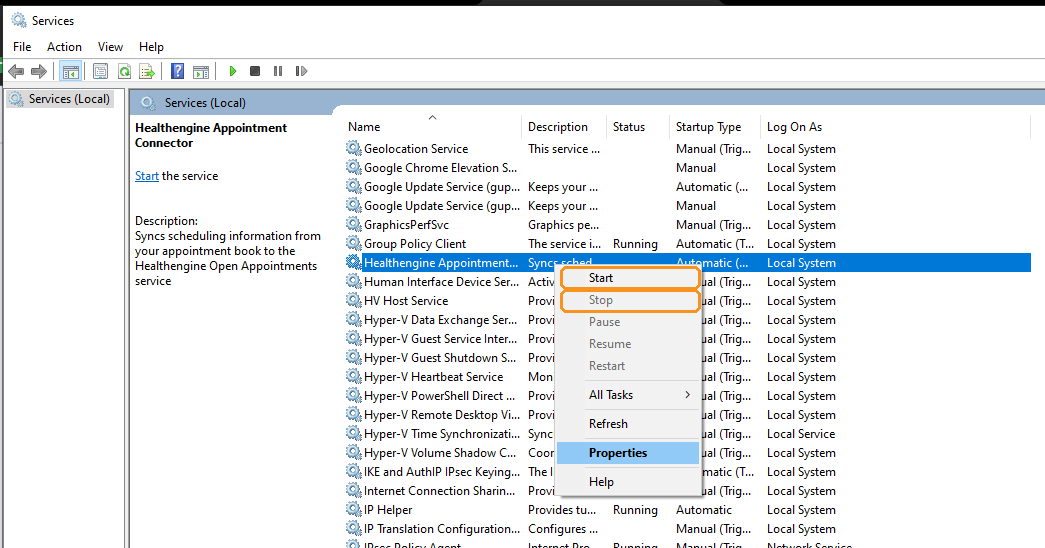
If the service will not start, restart the server and try again.
Step 3: Check Practice 2000 Is Working
Open Practice 2000 and check your appointment book loads as usual. If Practice 2000 shows an error, please contact the Practice 2000 help desk, then repeat Step 2.
Please Note: Healthengine works with Practice 2000 version 5.0 or newer, using the newer appointment book. If the connection dropped after an upgrade and Step 2 does not fix it, please contact our Support team.
Step 4: Check Your Appointments Are Showing
Wait a few minutes, then check your Healthengine profile to confirm your appointments are showing.
Contact Our Support Team
If your appointments are still not showing, our Support team is happy to help. To help us resolve the issue quickly, please have the following ready:
- your practice name
- your Practice 2000 version
- access to your server, or contact details for your IT provider
- TeamViewer installed on your server, so we can connect remotely
For ways to reach us, see Need more support? Here’s how to contact us.
You may also find this article helpful: Restarting your Healthengine Appointment Connector