
Vertical: GP, Dental, Pharmacy, Allied, Specialist
PMS Eligible: N/A
What pre-auth is
- Pre-auth is a temporary hold placed on a patient’s card for a set amount before the appointment.
- It’s not a charge at the time of pre-auth.
- After the appointment, when payment is taken, the final payment can be processed against the hold (if the final amount is ≤ the hold).
Who gets pre-auth
Pre-auth is automatically available for practices on any subscription that includes Payments.
Note: pre-auth is only supported for Stripe payments (not Tyro).
When pre-auth happens (timing rules)
Pre-auth timing is based on how far away the appointment is at the time it’s booked:
- If the appointment is within 5 days (≤ 5 days away): pre-auth runs at time of booking.
- If the appointment is more than 5 days away (> 5 days): card details are collected at booking, and pre-auth runs closer to the appointment date.
For bookings made > 5 days in advance, the current sequence is:
- 6 days prior: SMS reminder is sent to the patient.
- 5 days prior: pre-auth is attempted.
- 4 days prior: a second attempt is made if the first attempt failed.
Fees & billing
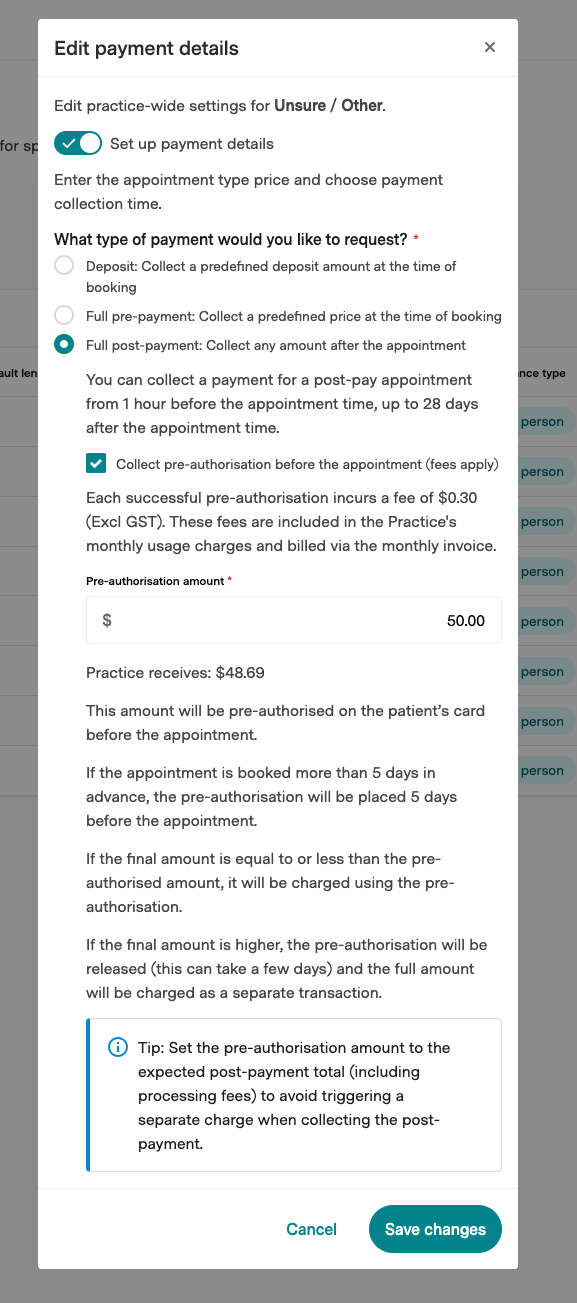
- $0.30 (excluding GST) per successful pre-authorisation.
- The fee is added to the practice’s monthly invoice.
⚠️ If you do not want to pay the $0.30 (excluding GST) fee per successful pre-authorisation, do not enable pre-authorisation in the appointment type’s payment details (under Full post-payment option).
Practice setup
When payments are enabled for a practice, they go through an onboarding flow to configure their payments setup. They’ll see the fees on the pricing screen.
.png?width=670&height=371&name=image-20260507-073242%20(1).png)
Pre-auth is configured per appointment type.
Enable (configure) pre-auth
- Go to Appointment Types
- Select the relevant appointment type
- Choose Edit payment details
- Under Full post-payment, enable Collect pre-authorisation during booking
- Set the pre-authorisation amount
Disable pre-auth
- Go to Appointment Types
- Select the relevant appointment type
- Choose Edit payment details
- Under Full post-payment, switch off Collect pre-authorisation during booking
Patient journey
For a post-paid appointment type with pre-auth enabled:
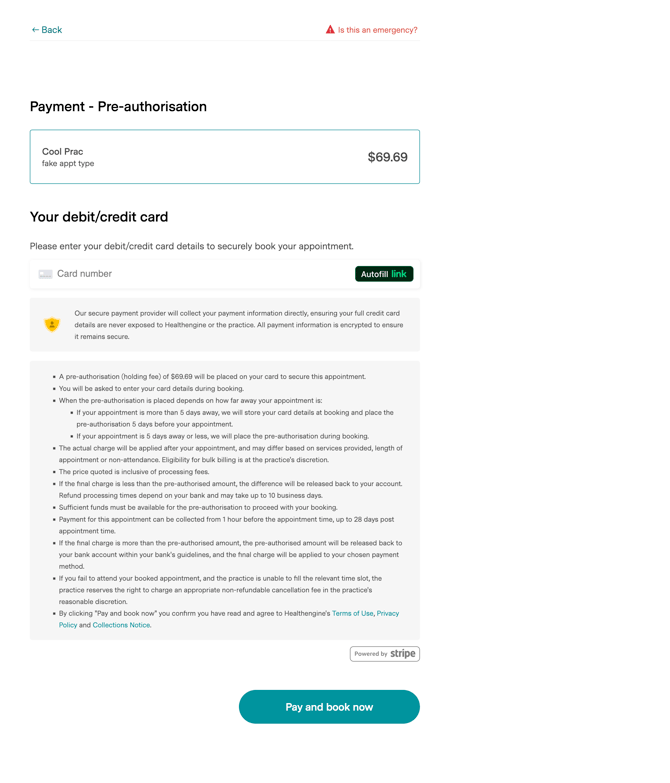
- During booking: the patient is prompted to enter card details.
- After booking: the booking is confirmed.
- Before the appointment:
- If the booking was made well in advance, pre-auth is attempted 5 days before the appointment (with a retry 24 hours later if needed).
- The patient receives an SMS reminder prior to the pre-auth attempt.
- After the appointment: the practice takes payment.
- If the final charge is the same or less than the pre-auth amount, the charge is applied against the existing hold.
- If the final charge is higher than the pre-auth amount, the payment provider may release the hold and charge the full amount as a new transaction.
Patient T&Cs on booking form:
How the pre-auth amount works
When you take payment after the appointment:
- Final charge ≤ pre-auth amount: we’ll charge against the existing hold.
- Final charge > pre-auth amount (e.g. due to transaction fees): the payment provider will release the hold and charge the full amount as a new transaction.
Important: released holds can take a few days to return to the patient’s available balance. During this time, the patient may need enough available funds for both the original hold and the new charge, which can cause payment failures.
Tip: set the pre-auth amount to cover the expected total (including transaction fees), or round up.
What happens when pre-auth fails- Failed pre-auths can be viewed in the Real-time notifications inbox (enable “Booking pre-authorisation failed” under Real-time notification settings).
- A failed pre-auth doesn’t automatically cancel the patient’s appointment when the pre-auth happens outside the booking flow.
- Following up with the patient (e.g., contacting them or confirming payment arrangements) is the practice’s responsibility.
FAQ
Does pre-auth charge the card immediately?
No - pre-auth places a temporary hold. The charge happens when payment is taken after the appointment.
If an appointment is booked far in advance, do you still pre-auth at booking?
No - if it’s booked more than 5 days ahead, we collect card details at booking and run pre-auth closer to the appointment date.
Where will pre-auth fees appear?
On the practice’s monthly invoice, as $0.30 (excluding GST) per successful pre-authorisation.