
Vertical: General Practice
PMS Eligible: BP, Pracsoft, Zedmed
We’re updating Recalls to make it quicker and easier for practices to find the right patients and complete follow-up work, especially when managing a large number of recalls. You should notice a more responsive page and a simpler day-to-day workflow.
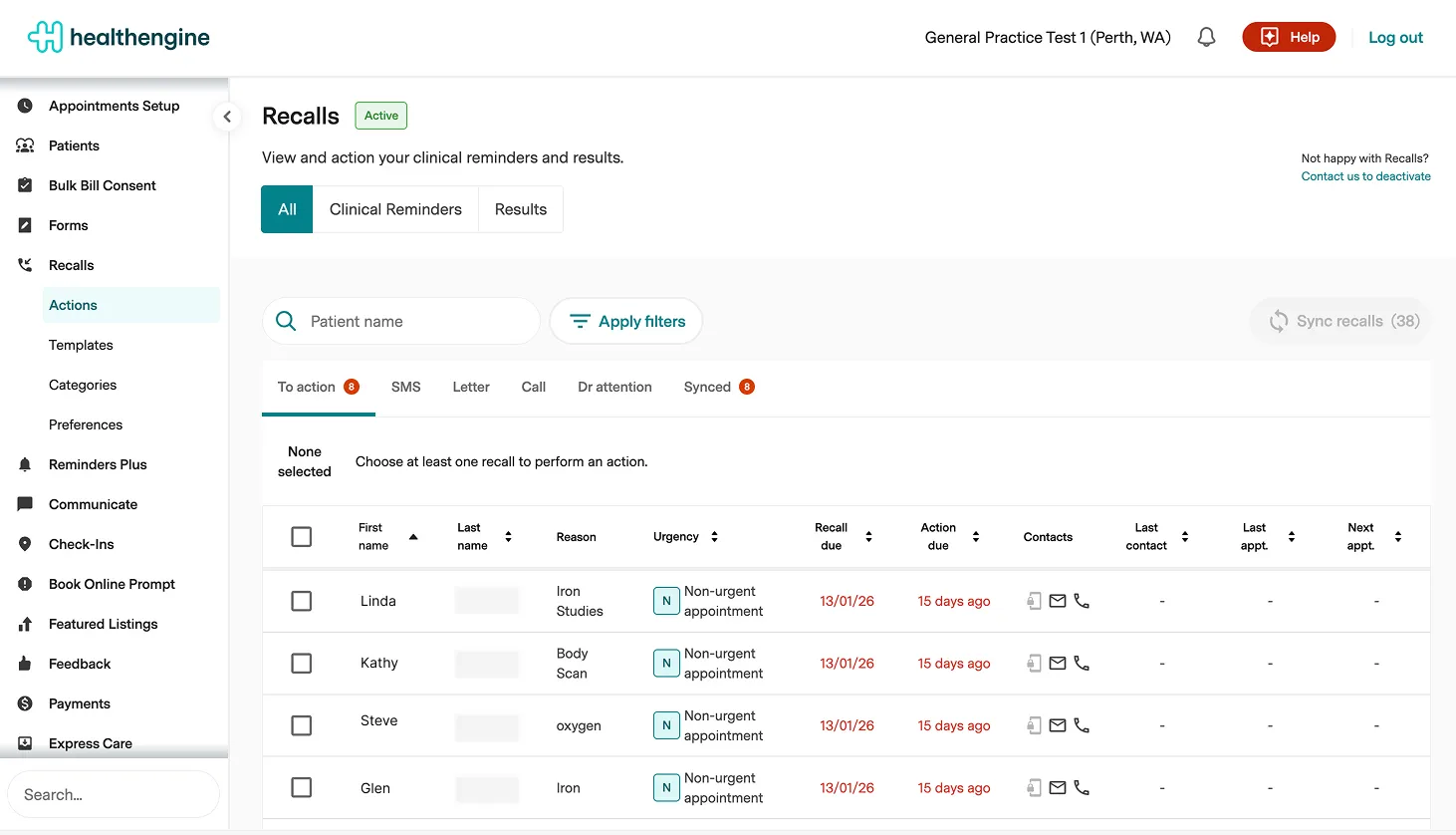
- Global filter for All, Clinical Reminders, or Results: Recalls can now be filtered by type (All, Clinical Reminders, or Results) using a global filter, making it easier to action recalls by type.
- Bulk actions across all tabs: Practices can select multiple recalls within a tab and apply an action in bulk (for example, marking multiple "Call" recalls with the same outcome).
- Faster loading via pagination: Recalls will load in smaller batches (50 at a time) for the tab you are viewing, instead of loading all recalls on page load.
- Filters moved to a side panel: Filters now live in a hidden side panel accessed via an "Apply filters" button.
- New communication detail filters: New filter options help identify recalls where patients do not have a valid mobile number, phone number, or mailing address.
- Category assignment filter removed: The "Category assignment" filter (including "unassigned") is no longer available, and any saved filters using it will be cleared.
- Option to pause automation: When cancelling contact attempts on automated recalls, you can now pause automation to prevent the recall from being re-queued.
- More detailed recall action history: The action history now includes more events and a detailed breakdown of recall activity.
- Acting user no longer required to view: Recalls data can be viewed in read-only mode without selecting an acting user first. Read-only mode is also available when data hasn't synced recently or if a sync error has occurred.
- Persistent tab and recall details: The currently viewed tab and recall details will persist on page reload and can be linked to directly.
- Column visibility moved to Preferences: Show/hide columns is now configured under Recalls → Preferences and applies across all tabs.
- Consistent column display: Configured columns now appear consistently across all tabs.
- Separate patient name columns: Patient first and last names now have separate columns with individual sorting options.
- Failed SMS tab hidden by default: The Failed SMS tab is now hidden by default to reduce clutter and will only appear when there are failed sends that require action.
- Recalls stats panel removed: The "Show recalls stats" panel has been removed and is now available on the Insights page.
- Count of all synced recalls: A total count of all synced recalls is now displayed for better visibility.
- Responsive layout: The layout now adapts flexibly to both larger and smaller screens for improved usability.
- Improved print view: The print view has been cleaned up for better readability and presentation.
Why this change is happening
- To deliver a faster, smoother recalls experience for practices with large datasets.
- To reduce performance issues and avoid the UI feeling heavy or cluttered.
What happens next
- After rollout, you will automatically be migrated to the new Recalls user experience.
Need help?
- If you have questions or need help, please reach out through the usual support channels.