
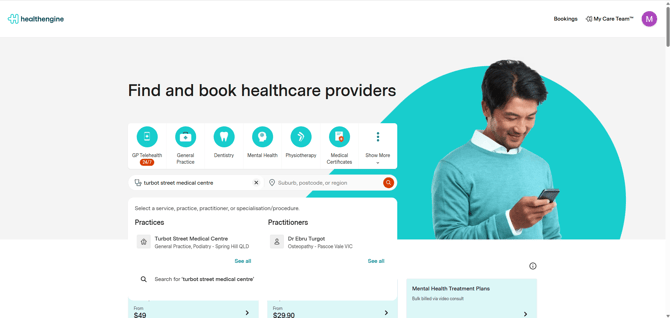
To find the contact details for your practice on the HealthEngine website, type into the search bar the name of the practice that you are looking for.
Some suggestions will appear based on what you type.
Once you are on the practice profile page, simply click ‘Contact’ (1) and you will be directed to the bottom of the page with all the relevant contact details (2)
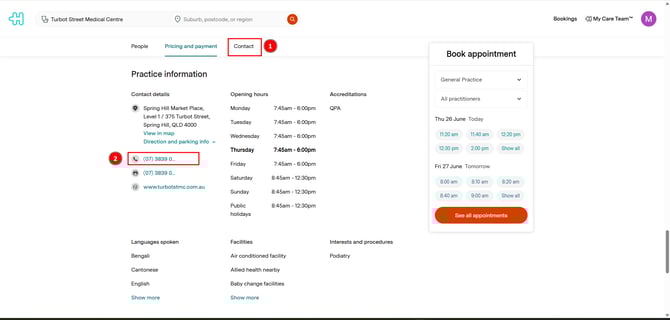
- Simply click on the phone number, and it will appear.
- You may also see a contact button you can click to submit an enquiry directly to the practice. This is a great way to let them know if you would like them to add any new appointment types or features to their online bookings, such as self-check-ins, waiting room, and reminders. Please note that not all practices allow this functionality.
Alternatively, you can check their website to see if they publish any contact email in their "Contact us" section.
I already booked an appointment, but I can't find the contact details
At the time of the booking, you should have received a booking confirmation like the one below. Please check your email folder (including the spam):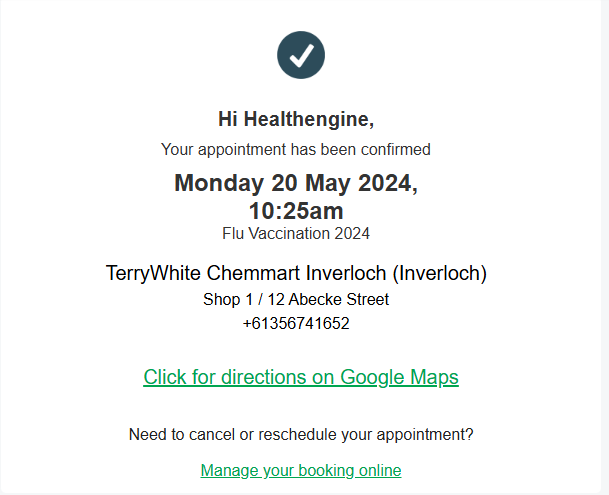
You will find the contact details of the medical practice you have booked with.
IMPORTANT: Practices do not list emails on their profiles, and you cannot contact them via email through Healthengine.