
Vertical: General Practice, Dental, Allied, Specialist
PMS Eligible: Best Practice, Communicare, Consult, Genie, Medtech, Pracnet, Pracsoft, Practice 2000, Zedmed, Helix, CorePractice, D4W, Dentally, Oasis/Exact, Oasis (SOE), Dentrix (SOE), Exact (HS1), Praktika, CareStack, Zavy 360, Back In Motion, Optomate, PPMP, Sunix, CorePlus, NOOKAL, Cliniko, MMex, PracSuite, Xestro, Front Desk 2014 v2014+, Gentu,
PMS Eligible: Best Practice, Communicare, Consult, Genie, Medtech, Pracnet, Pracsoft, Practice 2000, Zedmed, Helix, CorePractice, D4W, Dentally, Oasis/Exact, Oasis (SOE), Dentrix (SOE), Exact (HS1), Praktika, CareStack, Zavy 360, Back In Motion, Optomate, PPMP, Sunix, CorePlus, NOOKAL, Cliniko, MMex, PracSuite, Xestro, Front Desk 2014 v2014+, Gentu,
We’ve made it easier for you to create telehealth appointments. You will now have the ability to turn any appointment type into a telehealth appointment. This will ensure that patients receive clear instructions in their confirmation and reminder emails on how they can attend their appointment.
Steps to change the 'Attendance type' of an 'Appointment type':
- Log in to your Healthengine Practice Admin account
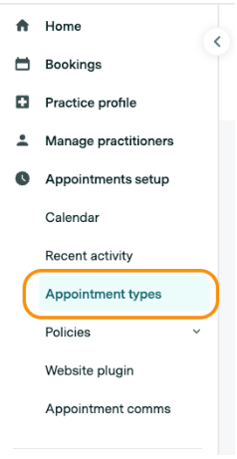
- Go to the Appointments setup tab and select Appointment types
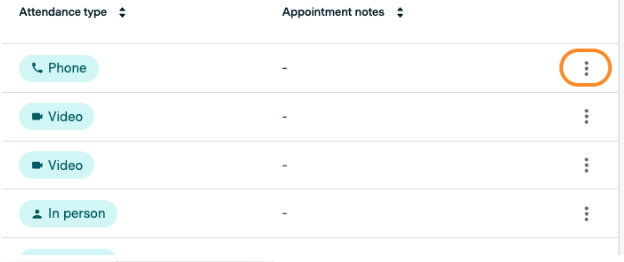
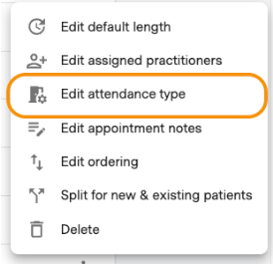
- Select the
icon on the 'Appointment type' and select Edit attendance type
- Select the 'Attendance type' that you would like to apply for that 'Appointment type'. The following telehealth options are available:
- Phone
- Video
- FaceTime
- Skype
- Healthengine Secure Video
- Coviu
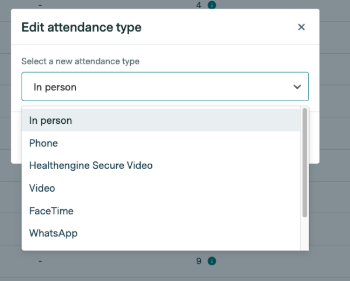
- Once you've selected an option, hit Save.
- This 'Attendance type' will then clearly be shown to the patient when they select an 'Appointment type' in the booking form:
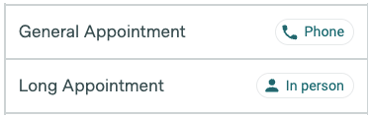
Note: When a new 'Appointment type' is created, it will default to the In-person 'Attendance type'.