
Vertical: GP, Specialist
PMS Eligible: BP, Pracsoft, Zedmed, Gentu
Healthengine’s New Patient Forms are designed to reduce admin and improve patient onboarding—whether patients book through Healthengine or not.
Our off-platform support allows practices to send digital New Patient Forms to new patients who book their appointment outside of Healthengine's booking platform (e.g. over the phone, via your website, or walk-ins). These forms can be completed before arrival and, for supported practice management systems (PMS), integrated directly into the patient record.
How does it work?
You can generate a secure URL or QR code to share your New Patient Form with patients who did not book via Healthengine. Once the patient submits the form, it is accessible via your Practice Admin portal—and if you're using a compatible PMS, key patient details may sync into the record automatically.
Which PMS integrations are supported?
Integration is available for the following PMS:
-
Best Practice
-
Pracsoft / Medical Director
-
Gentu
💡 Note: Gentu integration requires an exact match on the patient's first name, last name, and date of birth (case-insensitive). This matching logic varies slightly across PMSs. For more information on Gentu-specific logic, see our Integrated Off-Platform New Patient Forms for Gentu article.
How do patients receive the form?
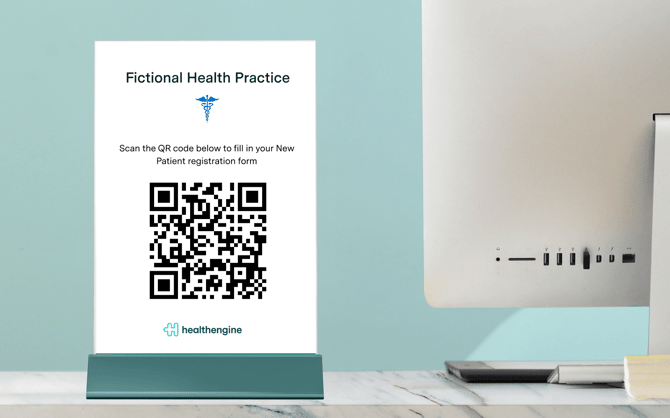
How you distribute the URL and/or QR code for your practice is up to you - you have full control over which patients receive an online copy of your New Patient Form and when.
We recommended printing out the QR code and displaying it in your waiting room, as this is the most efficient way to ensure all of your patients are completing their forms online.
Note: Patients can complete the form on any device, and no Healthengine login is required.
What if the form doesn’t sync to the PMS?
If a form fails to sync, you’ll still be able to view the completed form in Practice Admin and manually copy the details into your PMS if needed.
To be notified of sync failures:
-
Log in to Practice Admin
-
Go to Account → Notifications → Select the 'Real time' tab
-
Enable: “New Patient Form failed to sync to your PMS”
How do I turn on this feature?
To enable off-platform New Patient Forms:
-
Log in to Practice Admin
-
Click the Forms tab
-
Select New Patient Form → Preferences
-
Toggle on:
-
Non-Healthengine bookings: Enable sending of new patient forms for practices booking outside of Healthengine
-
Walk-in submissions (via QR code / URL): Allow PMS patient record updates for new patient forms submitted via QR code/URL
-
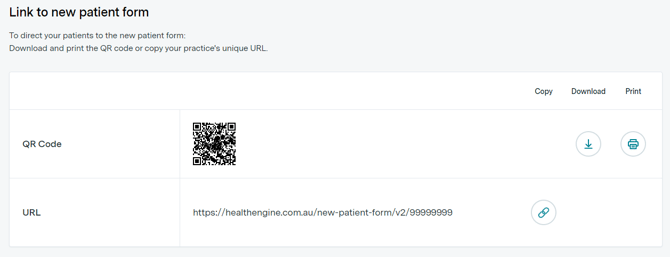
You can then access your unique URL and QR code under the Off-platform Forms section.
Do patients see different forms?
No. The same New Patient Form template is used whether the patient books via Healthengine or another method.
Can this feature be used alongside our Healthengine bookings?
Yes. Off-platform and on-platform forms can be used in parallel, ensuring all new patients complete the same digital form regardless of how they booked.
How much does it cost?
For General Practice clinics on our GP Complete bundle, this feature is included for free in your subscription.
For General Practice clinics not on our GP Complete bundle, please speak to your Customer Success Manager.
For clinics of other verticals, such as Allied or Dental, you will be able to purchase a subscription to the Off-Platform New Patient Forms product for $20/month; Integration is not currently available outside of the PMS types of Best Practice, Pracsoft/ Medical Director and Gentu.
Why aren't my off-platform New Patient Form submissions being integrated?
Your off-platform New Patient Forms for non-Healthengine bookings will integrate into your PMS if you meet the following criteria:
- You use an eligible PMS of Best Practice, Medical Director/Pracsoft, Gentu or ZedMed
- Your practice's Location settings have been set up in Practice Admin
- Your Appointment Connector is on version 2.4.11.0 or above
We recommend checking your Location settings first. You can access your 'Location settings' page in 2 ways:
- via the 'Location settings', under the Account section in Practice Admin, or
- via the 'Location settings' link in the off-platform forms page under the Forms section in Practice Admin
A form that was submitted previously is no longer showing in Practice Admin. What happened?
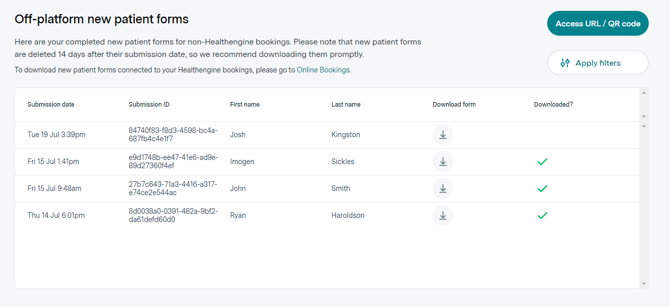
All submitted form data is automatically deleted from our systems 14 days after the form was submitted by the patient. This is to ensure that the data is kept as private and secure as possible. Please ensure all submitted form data is saved into your patient record system within 14 days of the patient submitting the form to avoid losing the data. You will be notified as soon as a form is submitted and reminded 2 days before the form data is due to be deleted so that there is plenty of opportunity to save the data before it is deleted.
How do I know if another member of staff at my practice has already downloaded a submitted form?
In the off-platform form submission list view, each submitted form has a checkmark next to it if it has already been downloaded by your practice. If there is no checkmark next to a form submission, you should download it as soon as possible to retain a copy of the data before it is deleted from Healthengine.
If you have any further questions or concerns about this feature, please get in touch with us using the 'Help' button on the bottom right of your Practice Admin account.