
This article outlines what you’ll see if your practice has started taking online payments for appointments via Healthengine. Your practice can request online payment prior to or after your appointment.
If the appointment type you’ve selected requires payment before or after your appointment, you’ll see this clearly displayed when you make a booking.
IMPORTANT: If an appointment is requesting your payment details, this is a practice decision and not decided by Healthengine; please reach out to your medical practice to provide your feedback.
Here’s how it works:
Online payment is taken before your appointment
- Start as usual by selecting your preferred appointment time or practitioner on Healthengine or via your practice's online booking button.
- Follow the booking steps and complete your appointment information for sections regarding who the appointment is for, and if you are a new or existing patient.
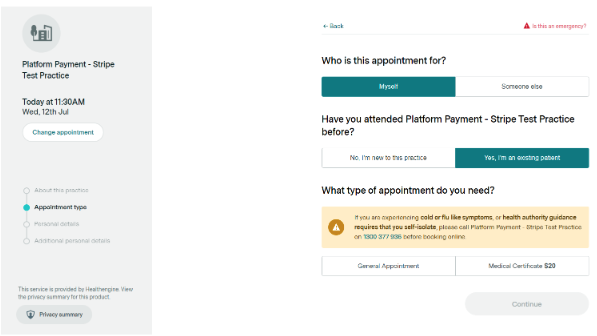
- When online payment is required prior to your appointment, the price will show next to the appointment you’ve selected. If your practice does not require payment prior to your appointment, no price will be shown.
- Once you’ve selected your appointment, you’ll enter your booking details.
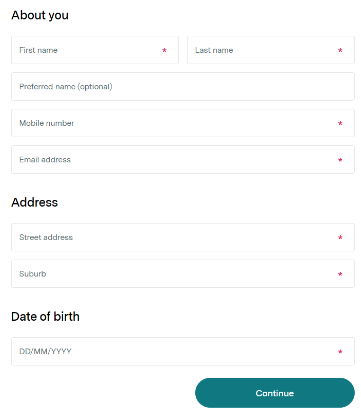
- Once you’ve entered your details, you’ll go to the payment page.
- You’ll be asked to enter your credit card details and click “Pay and book now”
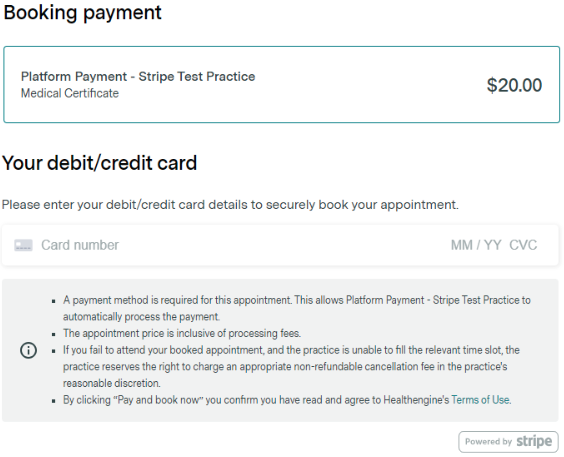
- The appointment fee is taken immediately from your account, and your booking is only confirmed once the fee has been secured. This happens almost instantaneously.
Online payment is taken after your appointment
- Start as usual by selecting your preferred appointment time or practitioner on Healthengine or via your practice's online booking button.
- Follow the booking steps and complete your appointment information for sections regarding who the appointment is for, and if you are a new or existing patient.
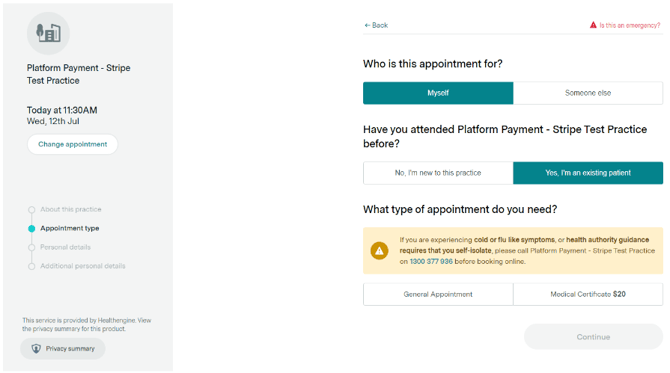
- When online payment is taken after your appointment (or payment is taken directly by the practice, not online), there is no price shown.
- Once you’ve selected the type of appointment you need, you’ll enter your booking details.
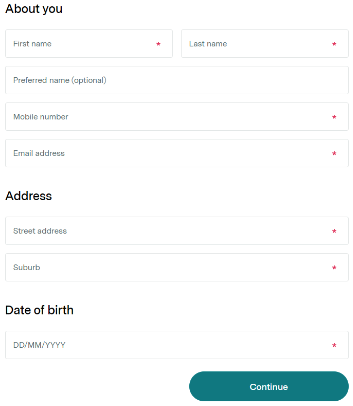
- Click “next” to proceed to the payment page.
- You now enter your credit card details and click “Confirm and book now”
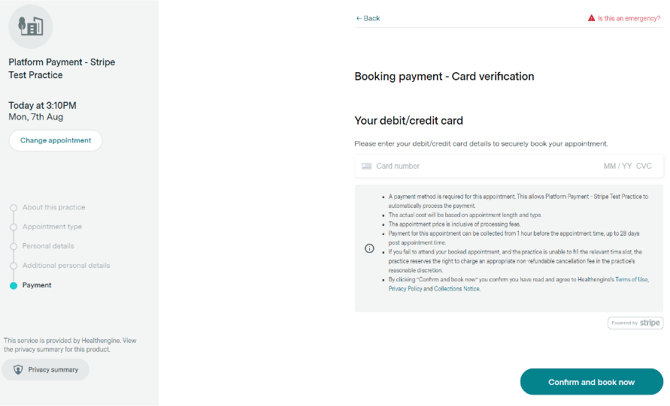
- Stripe (the merchant used to process payments) will check that your card is valid and able to make payments, and save these details against your booking. You’ll be automatically charged when your appointment is complete.
Payment FAQs
This is new - Why is my practice taking online payments for appointments now?
Online payments help save you time - whether that’s waiting in line to pay at the front desk, giving your credit card details over the phone when making your appointment or waiting in a call queue after your appointment to make payment.
Using online payments helps reduce your contact with the front desk and the time you spend in the practice.
What happens if I need a Medicare rebate?
The Medicare process is completed by the practice and remains the same. After your appointment, the practice can choose to either process the rebate for you or send you an invoice with the relevant Medicare Benefits Schedule number for you to process yourself. Useful instructions can be found here - https://www.servicesaustralia.gov.au/medicare-claims?context=60092
What happens if I need to cancel my appointment?
If you need to cancel your appointment, you can follow the instructions on your booking confirmation email, if the practice settings allow that, or alternatively, you must contact the practice directly.
IMPORTANT: All refunds are processed directly by the medical practice, so refunds and cancellation fees are set at the practice’s discretion.
Please contact the medical practice directly if you have any concerns about your refund or cancellation fee.
What happens if I need to reschedule my appointment?
You can contact your practice, which can reschedule the appointment for you and make the necessary changes to ensure your details are up to date.
I’ve tried to cancel or reschedule my appointment, but it won’t let me. Help!
In some cases, the practice may have disabled the ability for patients to cancel or reschedule, or the time is too close to the appointment time (in what is known as the “blackout period”), and the practice is unable to automatically manage that request. Please contact your practice directly to discuss your appointment cancellation or to reschedule your appointment.
When will I receive my invoice?
It is the responsibility of the practice to issue you an invoice if you require it.
Stripe (the merchant who processes these online payments) automatically sends an email payment confirmation once a payment has been processed. Please wait 24 hours before checking again.
The booking invoice you may have received from us is sent prior to any appointment taking place and cannot be used for claiming purposes.
For medical tax invoices, you will need to contact the specific practice you had an appointment with to request an itemised medical invoice for claiming purposes or a provider number. You should find those contact details on your booking confirmation email or their practice profile.
Who is Stripe? Why are they on my card statement?
Stripe is an online card payment service who have partnered with Healthengine and your practice to process your online payments.
I want to request a refund!
Your medical practice will be responsible for your booking refund and for the cancellation fee policy.
If you need to request a refund, please reach out to your medical practice directly using the contact details you will find on your booking confirmation email you received at the time of the booking.
IMPORTANT: We are unable to refund a patient on a practice's behalf; this can only be done by the practice via its secure portal.
Please note that if you experienced an error in the booking form but were charged anyway, this will likely show on your online banking as a pending payment.
In these instances, there is no need to contact the practice, and the payment will return to your account automatically within a 5-10 business-day processing time.
More information on how the practice will process your refund can be found in this guide:
Refunds - How to request them?
What cards can I use for my payment?
Stripe supports a number of card types, including:
- American Express
- China UnionPay (CUP)
- Discover & Diners Club
- eftpos Australia
- Japan Credit Bureau (JCB)
- Mastercard
- Visa
To find out more, visit Stripe’s relevant page here - https://stripe.com/docs/payments/cards/supported-card-brands